














Learn How to Automate Your Retail Business
Your retail customers are already using AI and automation. You can too, automating half your processes in under a year
There are enough disruptions rocking the retail industry, from inflation and rising operational costs to customer demand for “phygital” experiences and “shoppertainment”, so it is little surprise that, to keep ahead, you need to implement automation in your retail business. Or if you have already started, you need to add more.
Whether you are a retail executive, business unit or tech leader, or part of an internal improvement team, it does not matter what kind of retail environment you operate. It could be e-commerce or a chain of brick-and-mortar specialty stores. The fact is that automation is here to stay
What the buzzwords mean, and how much of your business you can automate
Cutting Through the Automation Jargon
It can also be overwhelming, not to mention confusing. The acronyms and jargon are everywhere:
- What is GPT?
- What is AI?
- What is “agentic” AI?
- What is an LLM?
Sure, you could consult a software vendor to get some answers. But you already know that those answers would be biased. A software vendor, after all, wants to sell you software.
That is why The Lab has created this “explainer” article for retail leaders like you. We are not beholden to any vendor; we are agnostic. We can (and will) tell you what all these buzzwords mean. We will strip away the marketing-speak. And, importantly, we will tell you what you can automate in your retail business.
The subhead of this article is a spoiler of sorts: After you read this article, you will see that you can automate at least 50 percent of your retail business processes and activities. And to clarify “under a year”: We mean “in as little as six to 12 months.”
The vocabulary of automation, from agentic AI to RPA, IDP, and API
What Is a Retail “Digital Worker”? Does That Mean “Automation”?
“Digital worker” is a handy umbrella term for you to grasp as you read this article and embark on your retail automation journey. Yes, it means “automation.” It also means “bot.” And it really includes terms like “AI” and even “agentic AI” (which we will define for you shortly). And do not forget RPA: that stands for Robotic Process Automation in retail; again, it is digital workers or bots.
The discrepancies between the definitions vary between industries; they even vary between peer retailers. And these new automation technologies can be implemented differently, too.
That is no cause for concern. What is important to you, as a retail leader, is what automation can do for your enterprise. So, we will not get into the technical weeds of picking one vendor over another. That is not the point of this article.
Let us dive into some basic definitions to clear the air.
What is the definition of “Agentic AI” for retail?
Agentic AI simply means that it can take action on other things. (Since it can act, it has “agency.”) Put it all together, and agentic AI is like the conductor of an orchestra; here are some of the “players”:
- Retail LLM = Large Language Model. This is technology that can process actual English, whether typed or spoken. It can break down a verbal command into next steps to take.
- Retail RPA = Robotic Process Automation. If you want to think of a “bot,” then RPA in retail is it. It is the one that performs the action on other systems your retail business uses, such as point-of-sale (POS), customer relationship management (CRM), inventory management system (IMS), and even familiar tools like Word and Excel.
- Retail IDP = Intelligent Data Processing. This technology can “read” documents, and pull the right info from them (even handwriting) without the need to train them on specific formats, e.g., different invoices from different suppliers.
- Retail API = Application Programming Interface. This is the “translator” between different downstream systems. For example, you could layer IDP atop your IMS to reconcile supplier invoices against actual inventory received.
All of these “musicians,” then, can “play together” in novel ways. For simplicity’s sake, we will just refer to them all, collectively, as “digital workers” in this article.
Think of digital workers similarly to the way you think of human workers: They can review input. They can take action. They can operate systems. They can produce outputs.
Working together, they deliver more than the sum of their parts, enabling a future state that was out of reach not long ago.
Why price and your existing tech stack are smaller obstacles than they seem
What Does Retail Automation Cost, and Must I Reorganize My Systems?
Upon reading about all these new automation technologies, many retail C-suite executives brace themselves for sticker shock. All this tech has got to cost a fortune, right?
No. Many of these new tools are pay-as-you-go or offer per-bot pricing models. The fees are often nominal.
Some of it is nearly free: Consider Microsoft Power Automate; it is already included with every e365 license; you just need to activate it.
And you do not even need to start big; in fact, it is easy to start small. Just add the new tech, in layers, atop your existing stack. It is a very gradual on-ramp.
The three readiness steps that get your processes and data automation-ready
How Do I Prepare My Retail Business for Automation?
You cannot automate until you standardize. All your retail processes and data must be standardized for automation. They cannot exist as rules of thumb, tribal lore, or yellowed pages in old procedure manuals.
So, all of the information needs to be gathered, analyzed, and made automation-friendly. There is a best-practice methodology for accomplishing this; here are the three steps you will need to take:
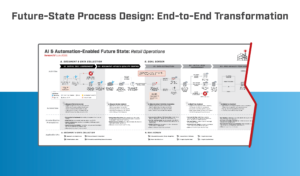
Step 1: Process-map the future state
Retail internal improvement teams are often relieved to learn how simple this step is. That is because it is all about the “what,” and not about the “how.”
In this first retail automation readiness step, then, you will want to map out your future automated state, with all its digital workers in place… without worrying about how you will get there. This includes the documentation of:
- Process activity steps and all retail workflows
- Future-state automation, including:
- AI (including agentic)
- RPA (robotic process automation for retail)
- Extended functions of various systems and platforms
- Standardization requirements:
- Data upstream retail intake quality
- Retail data formatting and its structure
- Areas for human intervening and review
- Upleveled analytics, including
- Metrics such as KRIs and KPIs
- Retail KPI thresholds and goals
- Standardized actions
- Standardized retail insights
Pay attention to our guidance for this step: Keep it simple. Many retail leaders, unfortunately, do not. They contrast their current state to the future state, which only makes this step overly complex.
Current-state comparison will happen; it will just happen later in this best-practice readiness process.
There is also a shortcut: The Lab’s Knowledge Base, which has captured and templatized more than 30 years’ worth of client-engagement IP, includes templates for best-practice future states that you can use for your retail business.
Step 2: Perform future/current-state gap-testing
You have just created your retail automation future state. Now you can, and should, gap-test it against the current state. This is about finding the requirements you need to get there: things like activities, workflows, and tools that will need to be changed and/or added.
Your approach here should mirror the one you had employed for Step 1: Do not stress over the “how.” Just list the gaps. Do not worry about the way you will bridge them. Not now.
List gaps that are as basic as checklists, and as advanced as adding upstream agentic AI to a retail process. Your final list should include:
- Retail data’s quality at intake
- Retail data structure and/or formatting
- Extant retail capabilities for automating
- Requirements for retail automation/digital workers
- Retail process design such as exception processing
- Performance management capabilities for your retail business
Step 3: Sort results by impact
Prioritize the previous list based on the most impact that can be delivered. Focus on impact that affects the point of automation itself… but also delivers the most value, upstream and downstream of that point of automation, across your retail enterprise.
Your priority list doubles as a roadmap. You now have a clear plan for onboarding digital workers.
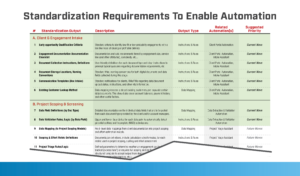
Supplement your internal retail efforts with the Knowledge Base from The Lab. We have done this before, so you can take advantage of proven and best-practice automation use-cases to choose from. We also offer:
- Catalogs for prioritizing your retail automation use-cases
- Development frameworks which your retail enterprise can use for deploying scalable code
- Pre-built dashboards to help you monitor retail digital “bot” performance
- Templatized standard requirements documentation you can use for your retail business
- Applicable project-management tools, templates, and standards
- Written guidelines for retail process improvement
- Maturity models that will facilitate development of internal retail capabilities
- Lists of valuable training courses you can share with internal teams
Your future-state retail process mapping gave you a great starting list of automations. Lists and catalogs from The Lab will help you flesh out and finalize that list. From there, you will begin seeing the benefits and ROI of implementing digital workers and robotic process automation in retail.
What internal traps should I avoid when automating my retail operation?
There are two big pitfalls which you should avoid when it comes to introducing automation and digital workers to your retail business:
First internal trap to avoid in retail automation: Prioritizing “hours” over “impact”
You want your retail automation initiative to succeed. And you want to measure its effectiveness.
Measure by impact rather than hours, and avoid over-engineering
What Retail Automation Mistakes Should I Avoid?
Too many retail executives will seek to quantify the benefit of automation in terms of the number of hours saved for each individual task that gets automated.
That is shortsighted. It overlooks how your digital workers will help the entire retail business to scale.
Avoid this trap. Do not focus on things like number of keystrokes or mouse clicks. If that is all you focus on, you will never move forward, and you will miss out on a lot of ROI.
Second internal trap to avoid in retail automation: Measuring individual vs. overall value
This internal trap for retail is similar to the first one. Program managers will often begin by setting thresholds which they simply make up, e.g., “each automation must recoup at least 600 hours a year.”
That is a bad way of looking at it. The “600 hours,” in this case, are only where the automation happens. It completely ignores what happens downstream of that point, where the value can easily leap to 10x the original.
The lesson here is to set your goals accordingly. “What percentage of your retail business is being done by bots?” is a more appropriate question to ask. The more you automate upstream, the more benefits your retail business receives downstream.
What is the right combination of retail platforms to automate?
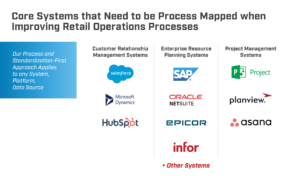
Your retail business uses core platforms: POS, IMS, CRM. But it also uses lots of ancillary systems: Outlook, Excel, Word, shared drives, etc.
You might assume you need to organize this tech stack in just the right way before introducing automation. You do not.
Today’s digital workers can automate whatever tech stack configuration your retail business employs. It does not matter how they are arranged. It does not matter how they are configured or used. It does not matter which vendor provides which platform.
Not only that, but digital workers can also automate what had until recently been considered impossible. No matter how much “human glue” you currently have, holding your different retail systems together, digital workers can step in to remove that burden
Here is a great example from the world of banking. The Lab has posted these four different YouTube videos, showing a digital worker performing the same “task,” but using four different core platforms:
- Fully Automated ACH Returns in Jack Henry Core
- ACH Stop Payments/Reversals Automation in FIS Core
- ACH Stop Payments Automation in Fiserv
- ACH Exceptions Reversals in Episys Quest
Four integration steps, with an eight-step agile build process for the automation itself
The Best-Practice Methodology for Implementing Retail Automation
Having deployed more than 2,000 digital workers in about the last eight years alone, The Lab has honed the best-practice methodology which you should employ for integrating digital workers and automation into your retail business. We have distilled this down to four steps, described below, which can be completed in 6 months.
As you will see below, for the fourth step (automating the actual retail work activities), we have also created an 8-step agile sub-process to ensure rapid deployment and reliable performance.
Here, are the best-practice methodology and roadmap for automating retail operations:
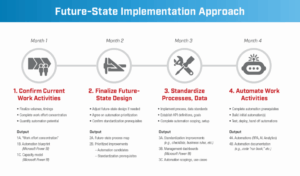
Each of the following retail automation roadmap steps includes its own activities and items to deliver:
What are the 4 best-practice agile development steps for introducing retail automation?
What is the best practice agile methodology for developing retail automations?
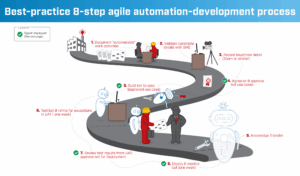
As noted earlier, Step 4 above (“’Bot-ify’ or actually automate the retail work activities”) has its own best-practice agile methodology for development and deployment, all developed by The Lab. We are not just a consultancy; with experienced project leads, data scientists, and bot developers in-house on our team in Houston (we never outsource or offshore), we provide 100% U.S.-based delivery. In other words, we do more than advise. We help you build and launch the digital workers themselves.
Here are the eight-step best practice agile development methodology:
The four executive-sponsorship requirements that accelerate rollout
What Is the Fastest Way to Deploy Automation in Your Retail Business?
When it comes to moving faster, and deploying more bots to do more work in your retail operations, you will need exemplary executive sponsorship, not to mention agile program management.
But this is not just another IT project. In fact, it is not really an IT project at all. It is “onboarding digital workers into our retail business to transform operations and increase scalable capacity.”
Here are some best-practice guidelines for executive sponsors of automation initiatives in the retail enterprise:
Top 4 executive sponsorship requirements for successful retail automation rollout
1. Be aggressive
- Focus on strategic value
- Avoid the temptation among the ranks to obsess over “hours saved”
- Provide clear goals
- Incentivize deployment
- Push back against scope creep
2. Move rapidly
- Green-light your retail automations in tranches of about ten
- Make sure that feasibility reviews for each digital worker are performed quickly
- Lock in selected automations with appropriate internal retail SMEs
- Repeat the process
3. Assign resources
- Appoint dedicated points of contact from the following areas:
- IT department
- Business-unit subject matter experts or SMEs
- Project managers
- Hold them to next-day turnaround
4. Prevent delays
- Cap UAT at one week
- The same for hyper care
- Fulfill all system-access requests
- Avoid the tendency to over-document
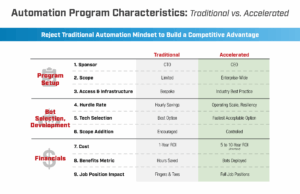
What are the biggest pitfalls to avoid when it comes to automating my retail operations?
Over-engineered approvals and reviews.
Avoid superfluous reviews and approvals. They do not add value; they only add complexity. Simply pose these questions as you proceed:
- Will it automate manual tasks?
- Will it pave the way for additional, future downstream automation?
- Can it be developed in 6 months or less?
If you get any two “Yes’s,” you are good to go.
Unrealistic benefit goals.
The real benefit from a retail “bot” is often many times the sum of its parts; recall how we have mentioned the “downstream” value of retail digital workers. Therefore, avoid artificial thresholds for automation approvals.
Unnecessary security.
There is a common tendency to “lock down” digital workers, based on a fear that they will stray where they should not. But digital workers, unlike their human co-workers, lack curiosity. They will always do what they are told. So layering in additional security or guard rails is not needed.
Treat them like humans who never peer into the wrong systems, and who stick to the permissions they are granted. This will keep your retail automation initiative moving smoothly, while maintaining both security and compliance at every automated activity.
Gains across customer experience, employees, risk, data, sales and compliance
What Are the 8 Strategic Benefits of Automating Retail Business Processes?
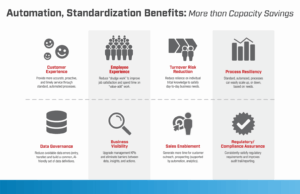
Most people think that “savings” is the big benefit of automating retail operations. But the real benefits reach wider, and deeper, than that, across all aspects of procurement, inventory management, merchandising, store operations, sales, checkout, fulfillment, delivery, and post-purchase service:
Better customer experience. When you bring standard processes, delivered by digital workers, to your customers, you can be confident they receive more consistent, faster, best-practice service.
Better experience for your employees. Pare back, or even eliminate, the repetitive activities that everyone hates doing. That boosts employee satisfaction and frees them up for more value-added/customer-serving activities. (Here is a great example from the world of retail banking: Processing accounts of deceased customers. Few employees enjoy this task. This video from The Lab shows how we automated the entire process.)
Less risk from employee turnover. Tribal knowledge in your retail enterprise is a risk. And the more essential it is, the riskier. Eliminate that risk via standardization and automation.
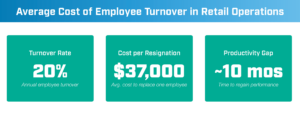
Contain your retail turnover cost
The cost to replace a single $81k salaried employee is about $241k for your retail enterprise. At usual turnover rates (just below 20 percent), cost-per-resignation is approximately $37k. Then the ensuing gap in productivity spans about ten
months. At those rates, turnover costs range from 151% to 251% of those salaried humans. With digital workers, it is a non-factor.
Scale processes up or down as needed. When you standardize and automate your retail processes, it is simple to scale up/down, according to needs, in real time. This eliminates the needs for reactive hiring, or layoffs.
Improved governance of your data. Cut down on data entry and transfer errors. Create a common, AI-ready repository of data definitions.
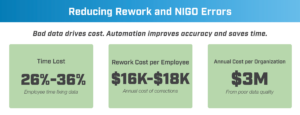
What is the cost of “NIGO data” in retail?
“NIGO” or “not-in-good-order” data causes anywhere from 26% to 36% of workers’ lost time, and they “spend” it merely fixing data. This typically adds up to about $16k to $18k per employee per year, just for making corrections. At a typical retail business, this adds up to at least $3 million a year, just fixing bad data.
What kinds of data benefits come with retail automation?
To get the most benefit from automation, you need great data. But you will already be creating great data to automate. Once it is standardized (in a standard model), taxonomized, defined, and tagged, it allows for some powerful new abilities:
- See how your digital and human workers are performing, often in real time.
- Get clear insights from a single source of truth. No more trying to “decipher” the data or reports.
- Gain new levels of proactive insight: Spot patterns, make informed predictions.
- Find even more areas to automate your retail operation.
If you would like more information on this topic, know that The Lab offers another complimentary explainer article on Data Intelligence, Analytics & Executive KPIs. And our templates can help you make this transformation in your retail enterprise, often in just six months.
The maintenance and support options that keep digital workers running
How Do I Future-Proof My Retail Automations?
At The Lab, we do not expect our clients to possess the same level of digital-worker expertise as we do. Still, we educate our clients throughout our automation engagements, to equip them to maintain their digital workers after we leave.
But life happens. This is why we offer a number of ways to keep your retail digital workers running reliably under a variety of internal and external circumstances:
Break/fix services. If a digital worker goes down, just call. We offer same-day rapid repair. There is no retainer or long-term commitment. Order and pay as needed.
Maintenance for digital workers. Retail “bots” typically need about an hour’s worth of maintenance each month. Rely on The Lab for routine performance audits. And if core system changes affect digital worker performance, we can provide guidance for re-training your digital workers.
Changes to core tech (ERP, CRM, etc.). In the rare event that you are swapping out a core platform for one from a different supplier, The Lab can identify the scope of the assignment, write you a quote, and get started on the transition ASAP.
Training for humans. Many training materials are available for free; The Lab has curated the offerings to help your retail team elevate their skills and capabilities rapidly. It will not be long before your own internal developers provide all the support you need.
Proven results in as little as six to twelve months
Automate Your Retail Enterprise With Help From The Lab
The Lab has assisted C-suite executives, business-unit and technology leads, and internal improvement teams to automate their businesses and processes, delivering quantifiable benefits amid large-scale transformation initiatives.
Our proven suite of services & solutions, including our unique Knowledge Base which harnesses more than 30 years’ worth of templatized, re-deployable client-engagement IP, paired with our patented Knowledge Work Transformation™ methodology, can help to automate your retail business in as little as 6 – 12 months.
Ready to automate your retail business? Book your screen-sharing demo with the experts from The Lab. Simply call (201) 526-1200 or email info@thelabconsulting.com today.