














Learn How to Automate Your Global Payments Operation
Add digital workers to automate more than half of your global shared services in less than a year
The Automation Imperative for Global Payments
Navigating the evolving technology landscape.
As an executive, business unit lead, or part of an internal improvement team at a global payments organization, you want to keep ahead of all the new technologies impacting your operation. But they’re changing fast: LLMs, GPTs, and all flavors of artificial intelligence or AI, including agentic and ambient, for example, can certainly be confusing.
What do they do? How can you use them to automate your global payments operation? Sure, you can contact a software vendor… but (no surprise) their end goal is to sell you software.
This article from The Lab will help you understand what all these technologies are, what they do (and don’t do), and how you can apply them, as needed, to introduce, increase, and/or accelerate automation in your global shared services organization.
This long-form explainer will teach you how to automate 50 percent, or more, of your current knowledge-worker activities… and accomplish that feat in just 6-12 months.
How does “digital workforce” differ from “agentic AI” in global payments?
These terms are often confusing and overlapping. “Digital workers” serves as the umbrella term, encompassing AI, agentic AI, and robotic process automation or RPA. Global payments organizations may define and implement these terms differently.
For this article, we’ll leave academic arguments behind. We just want to teach you what the technologies are, and what they can do for your global shared services business. The goal isn’t to compare specific technology brands. Rather, it is to help you implement automation quickly and efficiently.
How else, after all, will you surmount the manifold challenges facing your global payments operation today, whether they’re making the shift toward real-time payments or simply keeping ahead of evolving threats such as CNP (card-not-present) fraud?
Understanding Digital Workers and Automation Technologies
Defining AI, LLM, RPA, and the digital workforce ecosystem.
Agentic AI means that it can take action and have agency. It serves as the upstream coordinator of other technologies.
LLMs. These refer to
- Large Language Models, which can “understand and speak plain English.” Tell the LLM what you want; it can turn that into instructions for other technologies.
- RPA stands for Robotic Process Automation. With the word “robotic” in its name, you can see that it’s the one that what is requested. It can work directly with the systems your global payments function uses, such as core banking systems, payment gateways, account ledger systems, and more.
-
IDP stands for Intelligent Document Processing. This technology can “read” handwriting or text, directly from documents, often without even “knowing” how they’re formatted in the first place. This is powerful when, for example, you’ve got lots of differently-formatted invoices from a variety of vendors.
-
API stands for Application Programming Interface. This is a group of protocols (rules) that let one technology interface with another, software-to-software.
Collectively, we can call these tools, simply “digital workers.”
Think of digital workers the way you think of human workers. They can review input and execute actions accordingly. But the real value comes from compounding them—in which they handle more and more of a given payment-processing activity. This is the true synergy that’s available from implementing automation in global payments.
Platform and Technical Considerations
Costs, compatibility, and technical requirements.
Digital workforce technologies may appear expensive, but licensing costs are typically modest with reasonable per-seat fees. Some solutions are included in existing subscriptions, such as Power Automate within Microsoft packages.
These technologies integrate with your existing systems. You don’t need a new tech stack; you are simply adding functionality to your current infrastructure.
Common Pitfalls and Solutions
Avoiding the traps that derail automation projects.
While the steps for charting your to-be automation state, gap analysis, and prioritizing are relatively straightforward, there are a few hiding-in-plain-sight traps that tend to ensnare unwary global payments leaders as they embark on their automation planning:
Global Payments Automation Trap 1: The “hours saved” temptation
All too often, when trying to justify the time, effort, and expense of introducing automation into their operations, global payments leaders will look to quantify the value in terms of hours saved via automation. They’ll add up little incremental time-savers like how many keystrokes or mouse-clicks can be automated, and how much time it would’ve taken a person to do them.
That is short-sighted. Don’t focus on what the automation is removing from the current state; focus, instead, on the value it’s adding to the future state. Concentrate on how it increases operating leverage across your global payments/shared services function.
Global Payments Automation Trap 2: Focusing on individual benefits
This is a goal-setting pitfall, in which global payments leaders will seek to quantify benefits with arbitrary goals, for example: “Each bot must reduce 600 hours of manual labor each year.”
That seems laudable, but it’s an artificial threshold; worse, it’s woefully short-sighted. Those “600 hours” only apply to where the automation sits, without any recognition of its impact downstream. Think about that: Fixing an input error, and/or streamlining an input activity, delivers massive benefits downstream. Those “600 hours” could actually be saving thousands of hours, while increasing scalable capacity for your global payments organization, every day, every year.
Preparation Framework
Three essential steps before implementing automation.
Standardization is the essential first step. This involves documenting activities currently performed via tribal knowledge or rules of thumb. You will need to document, analyze, and standardize all procedures, whether they are informal decisions or exist in outdated employee manuals. Make the automation-ready.
Then you’re ready for the three main “prep steps” for automating your global payments operation:
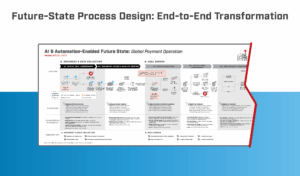
Global Payments Automation Prep Step 1: To-be process mapping
Your first step is to graphically represent (i.e., “map”) your future state in which your global operations are automated.
This is easier than it seems. Why? Because, at this step, you needn’t concern yourself with the “how.” Just depict your future-state processes, with all of the automation included. You’ll also layer in standardization and KPI analytics. So be sure to document:
- All global payments workflows
- All shared services process steps
- Automation you would like to implement in the to-be state:
- Agentic and/or ambient AI
- Digital workers/robotic process automation
- Extended functionality of different global payments systems
- Standardization requirements:
- Quality of upstream data intake
- Data formatting
- Global payments data structure
- Review and intervention by human workers
- Enhanced analytics:
- Monitor, measure, and report global payments KPIs and KRIs
- Targets and thresholds for triggered actions, alerts, and notifications
- Standardized actions and report-able insights
Step 1 is so deceptively easy that many global payments organizations make it unnecessarily complicated. They seem to obsess over comparing the current state’s processes to those of the future state.
Ignore that temptation. Stick to the best-practice plan we’re describing here. And should you need help, you can always contact The Lab. Our Knowledge Base, after all, harbors more than 30 years’ worth of client-engagement IP, including best-practice future states for automation.
Global Payments Automation Prep Step 2: Prerequisites identification
You just created (distraction-free) your global payments organization’s future automated state. Now you need to gap test its objectives against what you currently have. What needs to be changed, added, or cut, to make the future state possible? This applies to workflows, activities, and tools.
Another counterintuitive tip: Don’t worry about the how. Just list the gaps, without thinking about ways of closing them (that will come later). They could be simple, such as adding an automation-review checklist; or more involved, such as standardizing data elements for automation.
So look for, and list out, all the gaps you will need to close, including:
- Quality of your global payments intake data
- The format and structuring of global payments data across your different systems and repositories
- Any automation you have already installed
- Data access requirements for digital workers
- State gates and decision points for detecting and handling exceptions (i.e., specific, rare cases that automations can’t process on their own)
- Capability for handling global operations performance management
Global Payments Automation Prep Step 3: Arrange for impact
By doing this, you will end up with a list of actions required to achieve your future-state automations. You now have a roadmap for onboarding your digital workforce.
In Step 2, you made your list of automation prerequisites. It’s a big list. Now it’s time to prioritize them, based on the impact they will yield. So don’t just think of where the automation takes place; also look for impacts both up- and down-stream of that automation.
When you list them in order of global payments processing impact, you’ll simultaneously create your digital workers onboarding roadmap.
The list you create should not be your sole source of automation information and inspiration for your global shared services operation. That’s because The Lab’s Knowledge Base already possesses more than 500 automation use-cases; take a look at some of the automation & AI use-case catalogs we offer online. Talk about a jump-start for your efforts.
In addition to automation use-case catalogs to help you prioritize your projects, The Lab also provides:
- Development frameworks for implementing scalable code in your global payments organization
- Pre-built/templatized dashboards for measuring and monitoring the performance of your digital workers
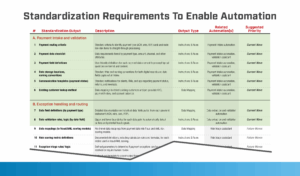
- Templates for documenting global payments standards requirements
- Project management tools and templates
- Tested and proven process-improvement guidelines
- Maturity models to aid with your shared services’ development of new capabilities
- Suggested training for your management and staff
By this step, you will have listed and prioritized your future-state automation requirements, and supplemented that with offerings from The Lab, saving you both time and effort when it comes to implementing the automations themselves. This, in turn, leads to maximum ROI from your global payments wall-to-wall automation initiative.
Which core and ancillary global payments platforms can be automated?
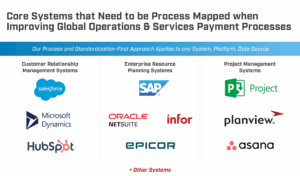
The short answer is “all of them.” Digital workers (and RPA, AI, and all those other acronyms we’d defined earlier in this article) are platform agnostic. It doesn’t matter which core you use; it could be from FIS, Fiserv, Jack Henry, or Machine Vault. It doesn’t matter which general ledger or account management system you use. Furthermore, it doesn’t matter how you use them: Global Payments Processor “A” might use the same platform differently than Global Payments Processor “B”; the automations don’t care.
In the adjacent world of banking, consider these quick demo video examples from The Lab, in which “bots” can automate virtually the same process… performed on different cores, from different providers:
- ACH Stop Payments/Reversals Automation in FIS Core
- ACH Stop Payments Automation in Fiserv
- Fully Automated ACH Returns in Jack Henry Core
- ACH Exceptions Reversals in Episys Quest
Check out all of the powerful and intriguing demo videos on The Lab’s YouTube channel.
Implementation Strategy
Best practice roadmap for deploying digital workers.
When it comes to onboarding digital workers into your global payments organization, there is a best practice which will allow you to do it in just six months. This is the process that’s been honed by The Lab; it’s what we share, and describe, below.
We’ll even dive into deeper detail in the fourth step, which includes an eight-step agile sub-routine for automating work activities within your global shared services organization.
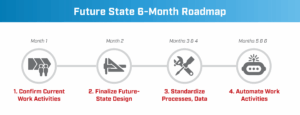
Can you bring a digital workforce into your global payments organization in just six months?
Yes you can, if you use the following four-step roadmap:
Step 1 for global payments automation integration: Ascertain as-is workflows
To-do’s:
- Ascertain global payments volume and timeframes
- Determine the work-to-effort concentration of global payments activities
- Calculate the digital workforce potential
Output deliverable:
- Calculated “work-to-effort concentration”
- Design for automation (create this in Microsoft Power BI)
- Develop the global payments organizational capacity model (also create this in Microsoft Power BI)
Step 2 for global payments automation integration: Architect the to-be state
To-do’s:
- Fine-tune the to-be automated global shared services design as required
- Gain consensus on the different automation priorities
- Verify the requirements and prerequisites for standardization
Output deliverables:
- To-be global payments graphical process map
- List of improvement priorities in order
Step 3 for global payments automation integration: Comprehensive standardization (data, processes)
To-do’s:
- Apply standards to all global payments processes and data
- Create and verify definitions of Executive and Management KPIs and objectives
- Finalize the scoping of the global payments setup and automation
Output deliverables:
- All global payments standardized updates and improvements, including business rules, gated decision points, checklists, and more
- KPI dashboards for management and executives (create these in MS Power BI)
- Finalized digital workforce scope
- Finalized automation use cases
Step 4 for global payments automation integration: Automate workflows
To-do’s:
- Finalize all requirements for global payments automation
- Construct the v1 automations
- Test the automations
- Deploy the automations
- Hand off the automations
Output deliverables:
- Actual global payments automations (robotic process automation, agentic AI, and data analytics)
- Documentation for all global payments automations documentation (user manuals, code “run book”)
What is the best practice agile development roadmap for automating global payments work activities?
Step 4 (Automate workflows) above has its own best-practice agile development process. That’s because The Lab isn’t just an automation advisory; we help you build, implement, deploy, and maintain your global payments automation.
Here, then, is the eight step best practice agile development roadmap for automating global payments work activities:
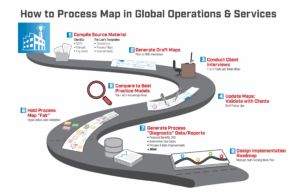
Global payments/shared services work-activity automation best-practice agile step 1: Identify what you can automate
Using your to-be process map (and The Lab’s automation catalog), identify the primary activity candidates for automation. The Lab’s Structured DiscoveryTM process will help you to rapidly uncover the highest-value candidates.
Global payments/shared services work-activity automation best-practice agile step 2: Confirm your candidates with SMEs
Consult with your internal global payments subject matter experts (SMEs) to confirm how they perform their work, using your existing systems.
Global payments/shared services work-activity automation best-practice agile step 3: Capture activity detail down to the mouse-click/keystroke
Record your SMEs as they perform and explain each global payments processing step.
Global payments/shared services work-activity automation best-practice agile step 4: Confirm your automation use cases
Approve and record all automation specs and details; confirm the requirements for the to-be state.
Global payments/shared services work-activity automation best-practice agile step 5: Construct the automation “bot,” per the approved specs
In this context, “spec” refers to “authorized automation use-case for this specific global-payments activity.” Here, you need to create the prototype of the automation and demonstrate it so you can obtain additional requirements.
Global payments/shared services work-activity automation best-practice agile step 6: UAT
“UAT” stands for user acceptance testing. In this step, you’ll want to test the bot, and refine for it for exceptions handling, over the course of a week’s worth of UAT.
Global payments/shared services work-activity automation best-practice agile step 7: Integrate UAT feedback
Before you can deploy the bot, you’ll need to first review the UAT feedback and refine the way in which the automation processes “exceptions” which it can’t handle on its own/which require human intervention.
Global payments/shared services work-activity automation best-practice agile step 8: Launch the bot; scrutinize its performance
Deploy the automated global payments digital worker. Hand it off to the business and to IT. Monitor its performance for a week.
Are there ways to accelerate automation deployment in global payments?
Absolutely. These span the broad categories of “agile program management” and “executive sponsorship.”
But for automation, it requires extra effort. This isn’t an IT project; don’t sell it as such. Couch the initiative as the onboarding of digital workers; use the four guidelines below.
Eight Key Benefits of Automation
From operating leverage to compliance assurance.
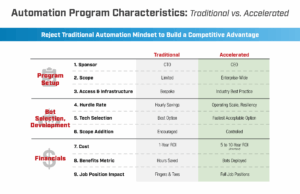
Cost savings are the most apparent benefit. However, digital workers deliver additional value to your global shared services operation:
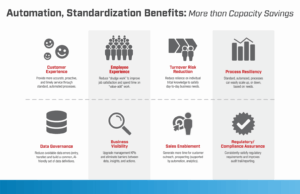
First global payments automation benefit: Operating leverage. Automated processes handle as much, or as little, volume as is needed, at any given time. That translates to what’s known as process resiliency for your global payments operation, eliminating the need for rapid staffing during upturns, or layoffs during downturns.
Second global payments automation benefit: CX lift. Serve your customers better; increase their customer experience or CX. Automation/digital workers help create this benefit via faster and more consistent best-practice process execution.
Third global payments automation benefit: Team morale. Automating the activities that everyone simply hates doing comes with benefits of its own. Not only is the negative aspect of global payments manual knowledge work eliminated, but employees become liberated to work on higher-value activities. Thus, the elevated employee experience is another “beyond cost savings” benefit of automating your global shared services operation.
Fourth global payments automation benefit: Increase sales. Whether it’s internal-clients expansion of your global shared services, or external extended reach of your global payments business, you will arm your sales team with better data for sales, prospecting, and upsales/cross-sales.
Fifth global payments automation benefit: Less tribal-knowledge risk. When employees retire or leave for other reasons, you don’t want them taking irreplaceable tribal knowledge out the door; that’s a serious risk to your global payments organization. With automation, daily business needs can be met, and continuity of operations ensured, regardless of employee turnover.
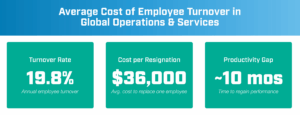
How much is turnover costing your global payments business?
You may be surprised to learn that it can cost up to $240,000 to replace an employee with just an $80,000 salary. Turnover rates are often just below 20 percent. Resignation cost is about $36,000. Ten months is the typical productivity gap. Add all those up, and turnover costs your global payments operation anywhere from 151% to 251% of an employee’s salary. With digital workers, none of these factors even apply.
Sixth global payments automation benefit: Improved data management. When you automate your global payments operation, you govern its data better. Data-entry and -transfer errors are reduced. Common data definitions make them AI-friendlier, too.
Reduce the cost of not-in-good-order data in global payments
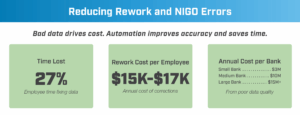
Anywhere from 25 to 35 percent of employees’ time is spent just fixing what we call “NIGO” data. This translates to about $17k, per 200 employee, per year. At a typical global shared services operation, the “cost of NIGO” rapidly runs in the millions, annually, just to remedy bad data quality.
Seventh global payments automation benefit: Better-informed decisions. You can’t automate your global payments processes without first standardizing your data for automation. That means that, hand-in-hand, you’ll be upgrading your executive and management KPIs; paired with data intelligence dashboards, you’ll be empowered to make better data-informed decisions.
Eighth global payments automation benefit: Compliance assurance. Given the high stakes of payment processing, this is one of the most valuable benefits of automating its activities. From AML (anti-money-laundering) through protection of PII (personally identifiable information), you’ll improve process consistency to best-practice levels, while fortifying your audit trail and reporting activities.
What are the three biggest global payments automation bottlenecks?
Don’t let common roadblocks stand in your path. Once you know them, you can recognize—and avoid—them. They are:
Global payments automation bottleneck 1: Unrealistic benefits goals
The value of a digital worker isn’t its speed or raw hours recouped. The real value lies in the overall scalable capacity lift, which is often many multiples of the “savings” it confers.
Global payments automation bottleneck 2: Too many security layers
Treat your digital workers as if they were responsible people; assign their security access accordingly. They won’t poke their digital noses into others’ systems; unlike people, they simply aren’t curious. They’ll always do what they’re told—no more, no less.
So, grant them permissions for employee-like activities (vs. “software”) and you will not only increase your ROI and productive capacity; you will also ensure compliance along all steps of the global payment processing cycle.
Global payments automation bottleneck 3: Too many reviews
Extra approvals don’t add value; they just masquerade as value. And they slow things down without need. Always pose the following questions when it comes to global payments automation reviews:
- Will it automate manual activities?
- Will it enable further downstream automation?
- Can we develop in less than 6 months?
If you get a “Yes” to any two of these questions, then you should proceed.
Data Intelligence and Analytics
Leveraging automation-ready data for decision making
Once your global payments data is automation-ready and resides within a standard data model (with proper taxonomy, glossary, and tags), you gain several new capabilities.
- You can monitor human global-payments worker productivity in near real time.
- You can monitor your bots in actual real-time.
- You can give managers and staffers real goals and support, since it’s based on actual data that’s been de-mystified/easy to understand.
- Introduce even more automation downstream of the automations you’ve already implemented in your shared services organization.
- Reduce risk by heeding patterns and pitfalls surfaced in the data analytics.
Here’s a great explanatory article from The Lab on Data Intelligence, Analytics & Executive KPIs, which you can review for more detail on this topic. The Lab’s templatized approach lets you implement this kind of transformative enablement in just 6 months.
Ongoing Support and Maintenance
Keeping your digital workforce operational.
Digital workers require minimal oversight compared to human employees. However, they do require regular maintenance and occasional repair. Many organizations initially fret when they introduce automation with help from The Lab; they fear they won’t be able to keep their bots up-and-running after we leave.
Your team will be well-prepared by project completion, as extensive knowledge transfer and training occur throughout the implementation process. Still, it’s unreasonable to expect your people to possess the same level of expertise as our bot developers and data scientists (all based in our Houston headquarters, by the way; we never outsource or offshore).
So The Lab offers a variety of automation support options for global payments clients:
- Automation maintenance. Digital workers require roughly an hour of maintenance each month. Let The Lab’s friendly experts provide regular, routine preventative maintenance and performance audits for your installed digital workforce.
- Rapid break/fix repair. When you need help ASAP, know that The Lab offers same-day repair services, to get your global payments automations up-and-running again. There’s no long-term commitment or retainer; it’s simply use/pay-as-needed.
- Training. If major system changes affect how your global payments automations interact with them, The Lab can quickly provide guidance and directions for re-training your bots; many training materials are free. We have selected effective training materials so your global payments team can expand their skill sets, creating ongoing internal support and enhanced capabilities.
- CORE changes. CORE (centralized online real-time environment) technologies change… sometimes your global payments operation will change technologies. Big disruptions like these can have a significant impact on your installed automation base. Let The Lab gauge the impact and provide you with a quote so you can keep humming along, interruption-free.
Getting Started
Your path to automated global payments operations.
Whether you’re a global payments executive, business or technology lead, or part of an internal improvement team, count on The Lab to help you elevate and automate your processes to deliver measurable results as part of a large-scale transformation.
Our comprehensive solutions—taking advantage of our Knowledge Base of 30+ years of templatized client-engagement IP, together with our patented Knowledge Work Transformation™ methodology—can automate your global shared services in just 6 to 12 months. And remember: Our experts are all based in Houston (meet the team), with zero outsourcing or offshoring.
Are you ready to automate your global payments? Book your screen-share demo by calling (201) 526-1200 or emailing info@thelabconsulting.com today.