













Automate Your Professional Services Firm in 6 to 12 months
More than half of your business’ knowledge-work activities can be automated
If, as an executive, you are looking to automate your professional services firm (whether it competes in strategy consulting, legal, IT services, architecture/engineering, HR, or any other discipline), the amount of terminology can feel overwhelming.
There is GPT. There is AI, including the “agentic” variety. There are LLMs. What is the difference between them? Which should you choose, and use? You can ask software vendors.
So if you are a C-suite executive, business team or technology lead, or part of an internal improvement team at a professional services firm that wants to automate, this article from The Lab takes a technology-agnostic view, independent of any vendor or platform. It is a basic long-form explainer article that will help you understand how to automate professional services.
You will learn how you can automate more than half of your professional services business’ current knowledge-work activities, and do so in only six to twelve months.
What Automation Really Is
Key terms and technologies behind them
You will hear lots of different terms used, such as “digital workforce,” “bot,” “AI,” “digital worker,” and so on. In practice, these terms all point to the same thing. That may sound surprising, but one professional services firm may define a term such as “RPA” differently than another.
Shortest answer: “Digital worker” is an umbrella term. It includes “bot,” RPA, and so on.
It is not just the definitions. It is how they are implemented. Peers will vary. None of this should faze you. What matters to you, in professional services, is staying ahead of trends, such as pricing-model pressures, increased regulatory compliance needs and, your reason for reading this, the need to automate and boost scalable capacity amid the disruption of the classic “pyramid” staff-allocation model that has prevailed in professional services for decades.
This article will explain for you what these technologies are, and what they can do.
We had mentioned, just above, three great professional services audiences for this article: C-suite executives, business team or technology leaders, or members of an internal improvement team. Whichever one best defines you, we recommend that you share this with your colleagues in the other two groups. You will all benefit.
“Agentic” AI simply means “having agency,” or “being able to take action.” Think of it as the upstream conductor of your professional services automation orchestra. The “players,” then, would include:
- LLM. This stands for “large language model.” Think of it as a technology that speaks and understands English. Give it commands; it can comprehend you, and turn your request into orders for the other technologies.
- RPA. That stands for robotic process automation. This is the tech (think of it as a multi-application macro) that performs the commands in any of your professional services firm’s existing tech stack. So, it can type and click and take action in your ERP, CRM, HRIS, and PSA (professional services automation) platforms, as well as ancillary systems like document-management systems, time trackers, and of course Excel and Outlook.
- IDP. This stands for intelligent data processing. It can “read” and extract information from free-form documents (even handwriting), without the need to train it on specific layouts first. So it can, for example, recognize specific data fields in differently-formatted vendor invoices.
- API. That stands for application programming interface. It is like a little Rosetta Stone that lets one technology speak to another, such as your IDP (noted above) with your professional services firm’s accounts-payable platform.
Think of this entire “orchestra,” then as your professional services business’ digital workers.
And think of them a lot like people. They can review input. They can plan and then perform tasks. And they can grow into broader, farther-reaching roles over time.
Together, these digital workers deliver far more than the sum of their parts, much as an orchestra outperforms a handful of individual musicians.
There are several to choose from, which might lead you to ask:
“Which is the most affordable automation platform for professional services?”
Licensing is often granted on a pay-as-needed basis, or per worker seat. So, it is not like you are looking at a massive upfront outlay to automate your professional services technology stack.
In fact, you can keep your tech stack as-is, because automation acts as a layer on top of what you already have (remember how we had mentioned “macros”?).
Some of these tools are incredibly easy to switch on; for example, Microsoft Power Automate is bundled in with e365, so you may already have it.
What to Do Before Your Automate
Standardize first, then pick your platform
It is a prerequisite. Standardization underpins automation. You cannot have your professional services firm’s processes stuck in tribal knowledge or gut rules.
You will need to standardize everything that is in your old training manuals, SOPs and inside the heads of your employees. Gather it. Document it. Standardize it.
How to Automate, Step by Step
From planning to deployed digital workers
Once your processes are standardized to the level needed for automation (“bot-ready”), you will then begin your professional services automation readiness following these three best-practice steps:
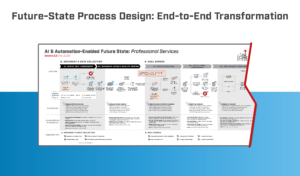
Step 1: To-be process mapping
At this point, draw up what your future professional services automation process map should look like. Do not worry about the “how”; that is why this step is easy and fun.
Depict your sought-after to-be process design, which will include:
- Workflows
- Process sequence
- To-be digital automation for professional services:
- AI (agentic)
- RPA (robotic process automation)
- Greater functionality of system(s)
- Standardization requirements:
- Input data quality
- Structure, tagging, file formats of data
- Personal review/human intervention
- Bolstered analytics:
- KPI and KRI metrics
- Targets
- Thresholds
- Standard actions
- Insights
Mapping your professional services firm’s future state takes effort, but not an excessive amount. One common pitfall is comparing current-state gaps to the future state you are mapping. As noted earlier, set that comparison aside for now.
The Lab can help. Our Knowledge Base includes pre-built templates for automation future state; simply contact The Lab to learn more.
Step 2: Current/future state gap testing
Now it is time to use your completed future state to gap-test it against what you currently have at your professional services firm. Compare workflows, activities, tools, procedures. See what must change to achieve your desired to-be state/industry best practice.
Do not worry about how you can bridge the gaps. Just list the gaps. List them all, from the simple (checklists) to complex (reconfiguration of data for digital workers).
Your gap list should include:
- Input data quality
- Data’s format
- Extant automation
- Requirements for additional automation
- Protocols for exception detection and processing
- KPI/performance management ability
Step 3: Prioritizing for impact
Take your requirements from the second step and look at them through the “enterprise impact” lens. Sure, you want to see what happens where the automation takes place… but you really want to include where it is most impactful, upstream and downstream of that automation.
Prioritize for broad and deep impact. This will create your to-do list for implementing automations; it is effectively a roadmap.
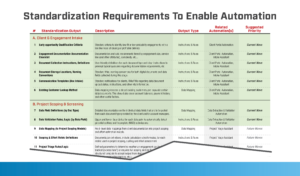
Your list of automations/digital workers does not have to be limited to your own to-be process mapping, gap-testing, and prioritization. The Lab offers a catalog of more than 100 standard automation use-cases especially for professional services; you can request your copy here. Catalog use-cases include things like cleaning up data for cross-sales, formatting for project setup, following up on past-due invoices, and many more.
In addition to this useful catalog, The Lab also offers professional services firms:
- Frameworks for the development of scalable code
- Pre-built KPI dashboards for measuring automation performance
- Documentation of standard requirements in template form
- Tools plus standards for managing the automation project
- Process improvement guidelines
- Models of maturity to speed development of required capabilities
- Curated lists of available high-quality training courses for your internal resources
The combination of your work, and The Lab’s templates, means faster implementation of your future-state automation capabilities, and the ROI it will produce.
When professional services leaders and their teams embark on their automation journey, they often stumble into two common pitfalls, or more pointedly make two common mistakes when it comes to creating the roadmap for their digital workers:
Mistake 1: Defining ROI by the wrong metric
Every professional services executive wants to ensure ROI from the automation effort. But how do you quantify it?
All too often, this appears as “number of hours saved.” Sure, automation will save time at the activity it is automating, but solely counting those hours is short-sighted. To capture the full ROI of any given automation, you need to include its power to help your entire business increase scalable capacity, and then scale.
So, if you just tally the hours saved, you will not be able to justify a given “bot.” Look past the keystrokes saved; consider, instead, the impact on your entire professional services firm.
Mistake 2: Focusing on upstream benefits
Program managers often insist on arbitrary targets, such as: “Each digital worker must recoup at least 600 hours a year.”
But that is just at the point of automation. It misses, vitally, the massive downstream benefit, where those “600 hours” could actually save about 6,000 hours. Focus, instead, on better goals and definitions. Example: “How much of this entire workflow is being automated?” This sets you up for the follow-on goal: “Let us automate the rest of it.” The more you automate, the more ability you have to automate even more.
Which of Your Systems Can Be Automated?
Digital workers are brand-agnostic and work across your entire tech stack
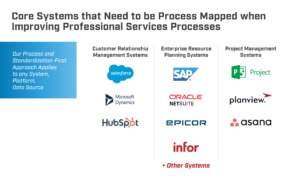
Virtually any combination of platforms in your professional-services tech stack can be automated. Digital workers do not care what systems they are using; they simply perform as instructed. They do not care which ERP, CRM, time-tracker, HRIS, or document-management system you use; they are brand-agnostic, too.
In many cases, today’s digital workers can automate processes that until recently had been deemed impossible to automate. If you can imagine it being automated in your professional services firm, odds are it can be automated.
You can see scores of examples of automations created by The Lab for actual clients (anonymized, of course), on our YouTube channel.
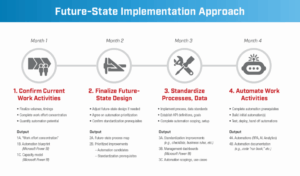
The Lab has developed a best-practice methodology for developing, installing, and maintaining professional services digital workers or “bots.” It is a four-step process, which we have outlined below. The fourth step even includes its own eight-step best practice methodology for agile development of digital workers, including deployment in your professional services business in only 6 months.
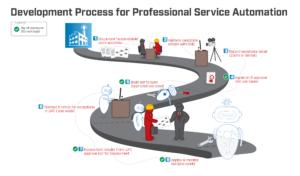
The Lab, at its heart, is an implementation firm. We do not merely consult with professional services businesses about their automation; we actually help them to build and implement it, using the eight-step best-practice methodology outlined below
Running the Program Right
Scale faster and avoid the common pitfalls
As a professional services executive, you naturally want your automation initiative to proceed rapidly. And you want to automate as much as possible.
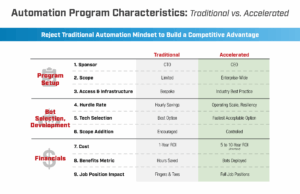
This requires taking agile program management, not to mention executive sponsorship, to a whole new level. If you frame the initiative as “onboarding a digital workforce” (and not “an automation project for IT”), you are already ahead of the game. Follow the guidelines listed below.
Follow these rules, and your odds of success will increase accordingly:
1. Assign points of contact
- Name dedicated resources from:
-
- SMEs
- IT
- Project managers
- Stick to one-day response turnaround
2. Ensure that executive sponsorship is proactive
- Establish incentives for meeting automation deployment goals
- Do not dwell on hourly savings; focus instead on strategic value
- Pre-emptively suppress “under the radar tweaks” and other forms of “scope creep.”
3. Choose automation candidates quickly
- Sign off on “waves” of ten-plus automations for each rollout
- Conduct fast feasibility reviews thereof
- “Nail down” the chosen automations with your professional services SMEs; establish a repeatable cadence
4. Prevent delays during development
- Cap UAT at one week, maximum
- Do the same for hypercare
- Make sure system-access requests are detailed and promptly fulfilled
- Do not over-document
The Value Drivers of Automation
Eight benefits that go beyond hours saved
“Savings” is only the beginning. When you automate business processes in your professional services organization, you will gain these eight benefits or value drivers:
Value Driver 1: Elevate your clients’ experience with your firm. They will get what they want and need, faster and more consistently, thanks to automated processes that are standardized, with fewer errors.
Value Driver 2: Make life better for your own team. Eliminate the rote tasks that everyone hates doing. Liberate your staffers for higher-value activities; that is a morale-booster. (In the world of banking, for example, The Lab helps to automate the depressing-yet-required activity of processing accounts of customers who have recently died. This four-minute video shows the “deceased accounts bot” in action.)
Value Driver 3: Cut down on the risk of tribal knowledge going out the door. With automation in your professional services business, all activities have been documented and standardized first. That, in turn, eliminates tribal knowledge that would otherwise vanish with the employees who possess it.
Cut down the costs of employee turnover
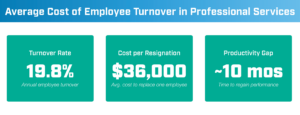
Here is a sobering fact: Replacing a single $80,000 salaried employee can cost your professional services business $240,000. Here is how: Using typical turnover rates just below 20 percent, the average cost-per-resignation is about $36,000; the average worker-productivity gap endures for 10 months. At that rate, turnover costs add up to 150 to 250 percent of that salaried worker. None of this applies to workers that are digital, a.k.a. bots.
Value Driver 4: Gain better control of your data. With automation comes improved data governance, along with reduced data-entry and -transfer errors. Plus your new data definitions are primed for AI.
What is “NIGO” data in professional services?
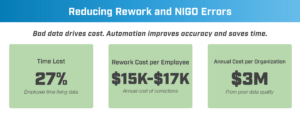
NIGO stands for “not-in-good-order.” Thus, NIGO data accounts for 24 to 36 percent of workers’ time lost… simply spent on fixing bad data. This costs about $15,000 to $17,000 per employee, each year. At a typical professional services firm, this quickly adds up to more than $2 million a year.
Value Driver 5: Increase your operating leverage. The name of the game here is “process resiliency,” which is defined as the ability to maintain full productivity, even as your workload increases or decreases. Digital workers eliminate the need for layoffs when times are bad, and the mad scramble to hire when times are good.
Value Driver 6: Find and onboard new clients. And that is after you increase your ability to reduce churn, and increase upsell and cross-sell activities. It is all powered by automation and advanced analytics serving up superior market insights.
Value Driver 7: Increase your ability to turn data into insight… and action. Automation, paired with auto-served, KPI-triggered data, arms your executives and managers with insights that improve strategic decision-making.
Value Driver 8: Keep the regulators at bay. When you automate professional services activities based on standardized data, you will improve regulatory compliance while reducing risk and creating a bulletproof audit trail.
Pitfall 1: Excess security requirements
It might seem odd for The Lab to advocate for less security, and not more, especially when it comes to automating professional services activities that are
subject to strict regulatory and compliance rules. We are not advocating for “less”; rather, we recommend “do not add extra.” Here is why:
Digital bots are not curious. They stay in their lane; in this regard, they are different from people. You could say that they are predictably boring.
So, grant them the same permissions you would grant to a person who behaved that way. Treat them as digital employees (not as “software”), and you will avoid the “too many security layers” pitfall of automating professional services.
Pitfall 2: Too many baked-in approvals and gates
Excessive reviews and approvals do not add value (even though they may look like they do). They just slow things down.
For any given bot candidate, simply ask “Does it automate tasks, even somewhat?” “Will it pave the way for more downstream automation?” and “Can it be created in less than half a year?” If at least two of these questions yield a “yes,” you can, and should, proceed with that digital worker’s development and deployment.
Pitfall 3: Unrealistic benefit requirements
Remember our noting that the impact of digital workers is synergistic (“two plus two equals five”)? It is way beyond the value of the actual activities being performed at the point of automation; it is often many times the sum of its components.
As we had mentioned above, there are way more benefits to be attained than artificial approval-benefit thresholds. Avoid the pitfall of creating them.
Keeping Your Automation Healthy
The data and support that sustain results
The longevity of your automation benefits requires good data… but you already possess it. It simply needs to be readied for automation.
When your data sits in a standard model, with a proper glossary, tagging, and semantic layering for AI, you gain new capabilities. You will see real-time performance of your workers, both human and digital. You will empower managers with data-driven decisions, clearly and easily. You will reduce risk by harnessing predictive modeling. And you will pave the way for automating even more activities, broadly and deeply across your professional services enterprise.
Check out The Lab’s deep-dive article about Data Intelligence, Analytics & Executive KPIs. It shows, for example, how The Lab’s templates can enable this type of transformation at your professional services business in just 6 months.
At the outset, some professional services executive sponsors are understandably wary of their firm’s ability to maintain their automations after their engagement with The Lab has concluded.
These concerns are misplaced. The Lab works shoulder-to-shoulder with your team as we create and implement automations, so there is significant knowledge transfer. Still, it is unreasonable to expect your people to possess the same level of automation expertise as our seasoned project leads, data scientists, and bot developers. That is why The Lab offers multiple ways to support your professional services automations, going forward:
1. Automation preventative care. This is the regular routine maintenance which “bots” require (typically about an hour a month); The Lab can provide this and routine performance audits, too.
2. System-update services. If your firm’s core software (such as PSA, ERP, or CRM) experiences upgrades which affect automation performance, The Lab can provide guidance and bot re-training as needed. If you are planning a wholesale core replacement, The Lab can help you with the transition; let us provide a quote and get started.
3. Training help. Many of the best training materials are free, but hard to locate. The Lab has curated them and shares them with your teams to keep skills current.
4. Break/fix services. Sometimes automations go down; The Lab provides same-day repair services, with no retainer or long-term contract; simply use, and pay, as needed.
Get Started with The Lab
Measurable results in 6 to 12 months
For more than three decades, The Lab has helped professional services firms’ executive sponsors to deliver measurable benefits from their transformation initiatives. We specialize in working with business-unit and technology leads, as well as internal improvement teams.
Our unique Knowledge Base packed with templatized, rapidly deployable client-engagement IP, along with our patented Knowledge Work Transformation™ approach
can automate your professional services firm in just six to twelve months. And our entire team is based in Houston; we never offshore or outsource.
Ready to automate your professional services firm? To book your screen-sharing demo with our friendly experts, simply call (201) 526-1200 or email info@thelabconsulting.com today.